
Load Testing Strategies for Event Platforms
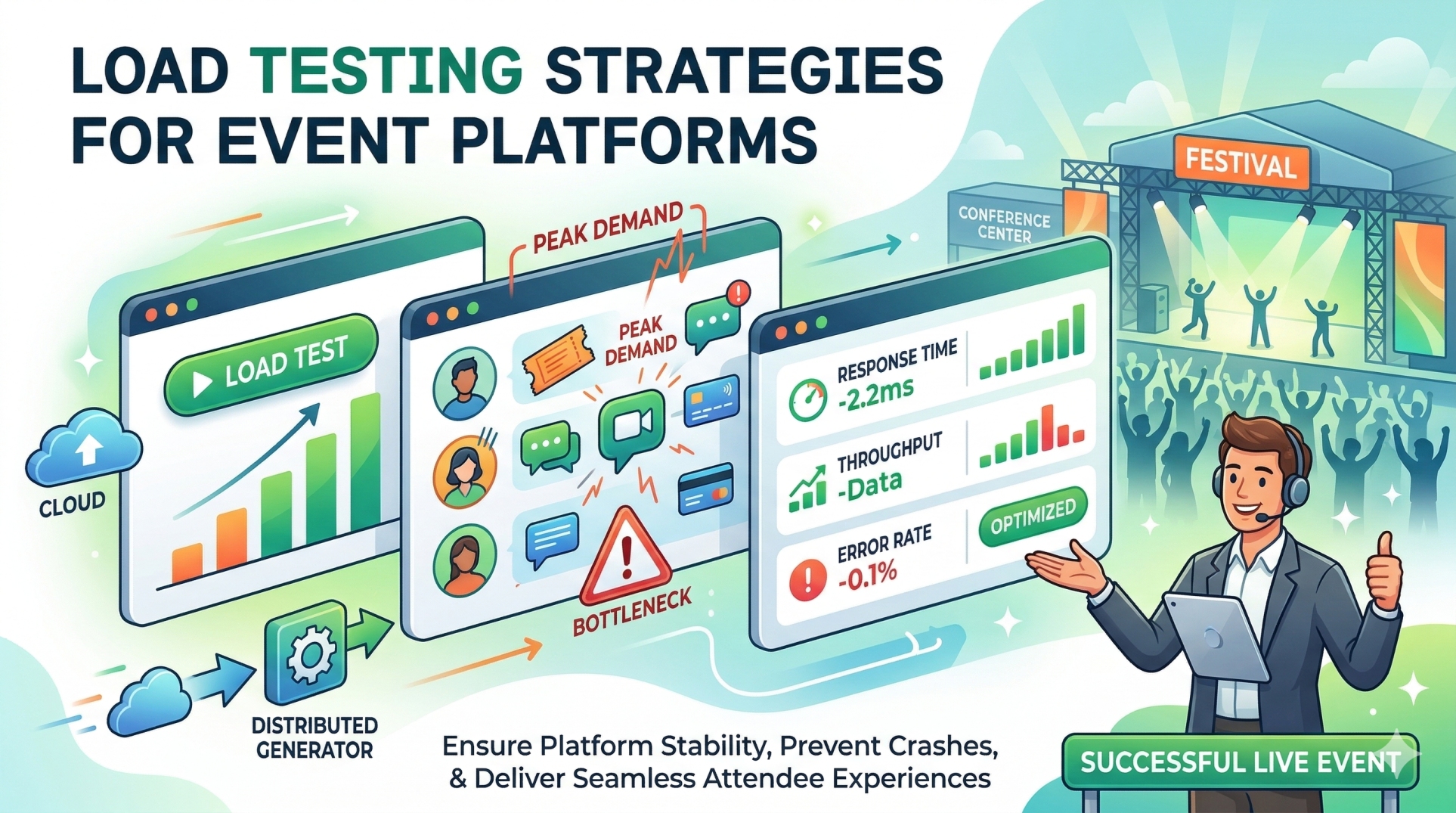
Load Testing Strategies for Event Platforms
Modern event platforms must handle unpredictable traffic spikes, especially during registrations, live sessions, and ticket launches. Without proper load testing, systems risk slowdowns, crashes, or poor user experiences at critical moments. A well-designed load testing strategy ensures performance, scalability, and reliability under real-world conditions.
Step 1: Understanding Load Testing in Event Platforms 🚦📊
• Simulates real-world user traffic to evaluate system performance 👥💻
• Identifies bottlenecks before live events occur 🔍⚠️
• Ensures platform stability under peak demand 📈🛡️
• Validates infrastructure scalability and responsiveness ⚙️📊
• Helps maintain seamless attendee experience 🎯📱
Step 2: Identifying Critical Event Workflows 🎯🔄
• User registration and ticket booking flows 🎟️📝
• Login and authentication processes 🔐👤
• Live streaming access and session joins 🎥📡
• Real-time chat, polling, and engagement tools 💬📊
• Payment processing and checkout systems 💳⚡
Step 3: Defining Load Scenarios 📊⚡
• Gradual load increase to simulate organic growth 📈👥
• Sudden traffic spikes during event launches 🚀📊
• Sustained peak load over long durations ⏱️🔥
• Concurrent user interactions across features 🔄👥
• Geographic distribution of users 🌍📡
Step 4: Choosing Load Testing Types 🧪📉
• Load testing to evaluate normal expected traffic 📊✔️
• Stress testing to push systems beyond limits 🔥⚠️
• Spike testing for sudden traffic bursts ⚡📈
• Endurance testing for long-running events ⏱️🛠️
• Scalability testing to assess system expansion 📈⚙️
Step 5: Selecting Tools and Frameworks 🛠️🔧
• Open-source tools for flexibility and customization 🧩📊
• Cloud-based testing platforms for large-scale simulations ☁️🚀
• Distributed load generators for realistic traffic patterns 🌍⚡
• Monitoring tools for real-time performance insights 📊👀
• Integration with CI/CD pipelines for continuous testing 🔄⚙️
Step 6: Designing Realistic Test Data 📄📊
• Use diverse user profiles and behaviors 👥📱
• Simulate real ticket types, sessions, and event flows 🎟️📅
• Include edge cases and invalid inputs ⚠️📄
• Avoid using production-sensitive data 🔐🚫
• Ensure data volume matches expected scale 📈📦
Step 7: Monitoring Key Performance Metrics 📊📉
• Response time and latency ⏱️📡
• Throughput (requests per second) 📈⚡
• Error rates and failure responses 🚨❌
• Server resource utilization (CPU, memory) 🖥️📊
• Network performance and bandwidth usage 🌐📡
Step 8: Identifying Bottlenecks and Failures 🔍⚠️
• Database query slowdowns 🗄️🐢
• API latency and timeouts 🔗⏱️
• Server overload and crashes 💥🖥️
• Inefficient caching strategies 🧠📉
• Third-party service limitations 🌐⚠️
Step 9: Optimizing System Performance ⚙️🚀
• Implement caching and CDN strategies 🧠🌍
• Optimize database queries and indexing 📊🔍
• Use load balancing and auto-scaling ⚖️📈
• Improve API efficiency and reduce payload size 🔗📦
• Enhance frontend performance for faster rendering 🎨⚡
Step 10: Continuous Testing and Pre-Event Validation 🔄📅
• Run tests regularly during development cycles 🔄🛠️
• Validate performance before major events 📅✔️
• Conduct rehearsal tests simulating real event days 🎭📊
• Monitor production systems during live events 👀📡
• Iterate and improve based on test insights 🔁📈
Conclusion
Load testing is essential for building reliable and scalable event platforms. By simulating real-world usage, identifying system weaknesses, and continuously optimizing performance, organizations can ensure smooth, high-quality experiences even during peak demand. A proactive load testing strategy not only prevents failures but also builds confidence in delivering successful digital events at scale.
See more blogs
You can all the articles below



































































Ready to Find Your Perfect Solution?
Let us show you how Event Software can transform your events

AI-powered event management platform that helps you create stunning events .